 secret-deus
decca30bef
secret-deus
decca30bef
Replace demo notes with 146 vault notes and diagram assets; keep credentials only in local .env.
90 lines
6.6 KiB
XML
90 lines
6.6 KiB
XML
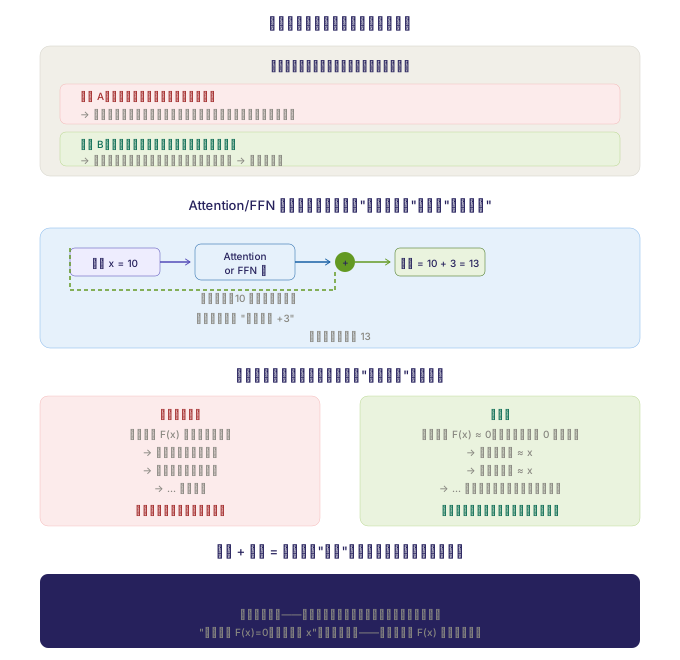


<svg xmlns="http://www.w3.org/2000/svg" viewBox="0 0 680 660" width="100%" role="img">
|
||
<title>残差 + 主干的角色分工</title>
|
||
<desc>残差保留原始信号,Attention/FFN 学习需要的修正部分</desc>
|
||
<style>
|
||
.th { font-family: -apple-system, sans-serif; font-size: 13px; font-weight: 500; fill: #26215C; }
|
||
.ts { font-family: -apple-system, sans-serif; font-size: 11px; fill: #5F5E5A; }
|
||
.tm { font-family: -apple-system, monospace; font-size: 10px; fill: #26215C; }
|
||
.tc { font-family: -apple-system, sans-serif; font-size: 10px; fill: #888780; }
|
||
.tb { font-family: -apple-system, sans-serif; font-size: 11px; font-weight: 500; fill: #26215C; }
|
||
.tr { font-family: -apple-system, sans-serif; font-size: 10px; font-weight: 500; fill: #A32D2D; }
|
||
.tg { font-family: -apple-system, sans-serif; font-size: 10px; font-weight: 500; fill: #0F6E56; }
|
||
</style>
|
||
|
||
<text class="th" x="340" y="28" text-anchor="middle">用个生活例子说明残差和主干的分工</text>
|
||
|
||
<rect x="40" y="46" width="600" height="130" rx="10" fill="#F1EFE8" stroke="#D3D1C7" stroke-width="0.5"/>
|
||
|
||
<text class="tb" x="340" y="70" text-anchor="middle">想象你在写一段文字,每次修改有三种方式:</text>
|
||
|
||
<rect x="60" y="84" width="560" height="40" rx="6" fill="#FCEBEB" stroke="#F09595" stroke-width="0.3"/>
|
||
<text class="tr" x="80" y="100">方式 A:扔掉旧的,从头重写(没有残差)</text>
|
||
<text class="tc" x="80" y="118">→ 每改一次可能全盘推翻,改几版之后初稿完全丢了,质量反而变差</text>
|
||
|
||
<rect x="60" y="132" width="560" height="34" rx="6" fill="#EAF3DE" stroke="#97C459" stroke-width="0.3"/>
|
||
<text class="tg" x="80" y="148">方式 B:保留上一版,在它基础上修改(有残差)</text>
|
||
<text class="tc" x="80" y="164">→ 每次只改需要改的部分,好的保留,差的修正 → 越来越完善</text>
|
||
|
||
<text class="th" x="340" y="210" text-anchor="middle">Attention/FFN 层学到的是什么?是"需要的修正",不是"全部重算"</text>
|
||
|
||
<rect x="40" y="228" width="600" height="120" rx="10" fill="#E6F1FB" stroke="#85B7EB" stroke-width="0.5"/>
|
||
|
||
<rect x="70" y="248" width="90" height="28" rx="5" fill="#EEEDFE" stroke="#534AB7" stroke-width="0.5"/>
|
||
<text class="tm" x="115" y="267" text-anchor="middle">输入 x = 10</text>
|
||
|
||
<line x1="160" y1="262" x2="190" y2="262" stroke="#534AB7" stroke-width="1.5" marker-end="url(#a1)"/>
|
||
|
||
<rect x="195" y="244" width="100" height="36" rx="6" fill="#E6F1FB" stroke="#185FA5" stroke-width="0.5"/>
|
||
<text class="tm" x="245" y="260" text-anchor="middle">Attention</text>
|
||
<text class="tm" x="245" y="274" text-anchor="middle">or FFN 层</text>
|
||
|
||
<line x1="295" y1="262" x2="330" y2="262" stroke="#185FA5" stroke-width="1.5" marker-end="url(#a2)"/>
|
||
|
||
<circle cx="345" cy="262" r="10" fill="#639922"/>
|
||
<text class="tm" x="345" y="266" text-anchor="middle" fill="#fff">+</text>
|
||
|
||
<line x1="355" y1="262" x2="390" y2="262" stroke="#639922" stroke-width="1.5" marker-end="url(#a3)"/>
|
||
|
||
<rect x="395" y="248" width="90" height="28" rx="5" fill="#EAF3DE" stroke="#3B6D11" stroke-width="0.5"/>
|
||
<text class="tm" x="440" y="267" text-anchor="middle">输出 = 10 + 3 = 13</text>
|
||
|
||
<line x1="70" y1="248" x2="70" y2="290" stroke="#639922" stroke-width="1.5" stroke-dasharray="4,3"/>
|
||
<line x1="70" y1="290" x2="335" y2="290" stroke="#639922" stroke-width="1.5" stroke-dasharray="4,3"/>
|
||
<line x1="335" y1="290" x2="335" y2="272" stroke="#639922" stroke-width="1.5" stroke-dasharray="4,3"/>
|
||
<text class="tc" x="200" y="302">残差直通:10 原样传到输出端</text>
|
||
|
||
<text class="tc" x="245" y="322" text-anchor="middle">层只负责算出 "多出来的 +3"</text>
|
||
<text class="tc" x="340" y="340" text-anchor="middle">不需要重新算出 13</text>
|
||
|
||
<defs>
|
||
<marker id="a1" viewBox="0 0 10 10" refX="8" refY="5" markerWidth="5" markerHeight="5" orient="auto"><path d="M2 1L8 5L2 9" fill="none" stroke="#534AB7" stroke-width="1.2" stroke-linecap="round"/></marker>
|
||
<marker id="a2" viewBox="0 0 10 10" refX="8" refY="5" markerWidth="5" markerHeight="5" orient="auto"><path d="M2 1L8 5L2 9" fill="none" stroke="#185FA5" stroke-width="1.2" stroke-linecap="round"/></marker>
|
||
<marker id="a3" viewBox="0 0 10 10" refX="8" refY="5" markerWidth="5" markerHeight="5" orient="auto"><path d="M2 1L8 5L2 9" fill="none" stroke="#639922" stroke-width="1.2" stroke-linecap="round"/></marker>
|
||
</defs>
|
||
|
||
<text class="th" x="340" y="380" text-anchor="middle">训练初值到收敛:残差让模型从"不做改变"逐步学起</text>
|
||
|
||
<rect x="40" y="396" width="280" height="130" rx="8" fill="#FCEBEB" stroke="#F09595" stroke-width="0.3"/>
|
||
<text class="tr" x="180" y="418" text-anchor="middle">如果没有残差</text>
|
||
<text class="tc" x="180" y="438" text-anchor="middle">初始化时 F(x) 的输出是随机的</text>
|
||
<text class="tc" x="180" y="456" text-anchor="middle">→ 第一层输出乱七八糟</text>
|
||
<text class="tc" x="180" y="474" text-anchor="middle">→ 第二层输入乱七八糟</text>
|
||
<text class="tc" x="180" y="492" text-anchor="middle">→ ... 越传越乱</text>
|
||
<text class="tr" x="180" y="514" text-anchor="middle">深层网络训练极慢甚至训不动</text>
|
||
|
||
<rect x="360" y="396" width="280" height="130" rx="8" fill="#EAF3DE" stroke="#97C459" stroke-width="0.3"/>
|
||
<text class="tg" x="500" y="418" text-anchor="middle">有残差</text>
|
||
<text class="tc" x="500" y="438" text-anchor="middle">初始化时 F(x) ≈ 0(权重都是接近 0 的小数)</text>
|
||
<text class="tc" x="500" y="456" text-anchor="middle">→ 第一层输出 ≈ x</text>
|
||
<text class="tc" x="500" y="474" text-anchor="middle">→ 第二层输入 ≈ x</text>
|
||
<text class="tc" x="500" y="492" text-anchor="middle">→ ... 每一层输入都和原始输入差不多</text>
|
||
<text class="tg" x="500" y="514" text-anchor="middle">然后逐步学出需要改的地方,平稳收敛</text>
|
||
|
||
<text class="th" x="340" y="556" text-anchor="middle">残差 + 主干 = 每层只学"增量",整个网络是逐层累积的修正</text>
|
||
|
||
<rect x="40" y="574" width="600" height="74" rx="8" fill="#26215C"/>
|
||
<text class="tb" x="340" y="598" text-anchor="middle" fill="#fff">残差负责"保存已有的好东西",Attention/FFN 负责"找出需要改进的地方"</text>
|
||
<text class="tc" x="340" y="618" text-anchor="middle" fill="rgba(255,255,255,0.7)">两者缺一不可——没有残差深层训不动,没有主干信息永远不变</text>
|
||
<text class="tc" x="340" y="636" text-anchor="middle" fill="rgba(255,255,255,0.7)">"最差情况 F(x)=0,输出还是 x"只是下限保障——真正靠的是 F(x) 学出来的修正</text>
|
||
|
||
</svg> |
